
This article will present the security model adopted for Authenticator and Crypto Warden to guarantee user data protection.
Currently Sentinel offers different ways to store user data:
- iCloud Keychain (iOS, macOS)
- Encrypted Storage (Android)
- Sentinel Cloud (iOS, macOS, Android)
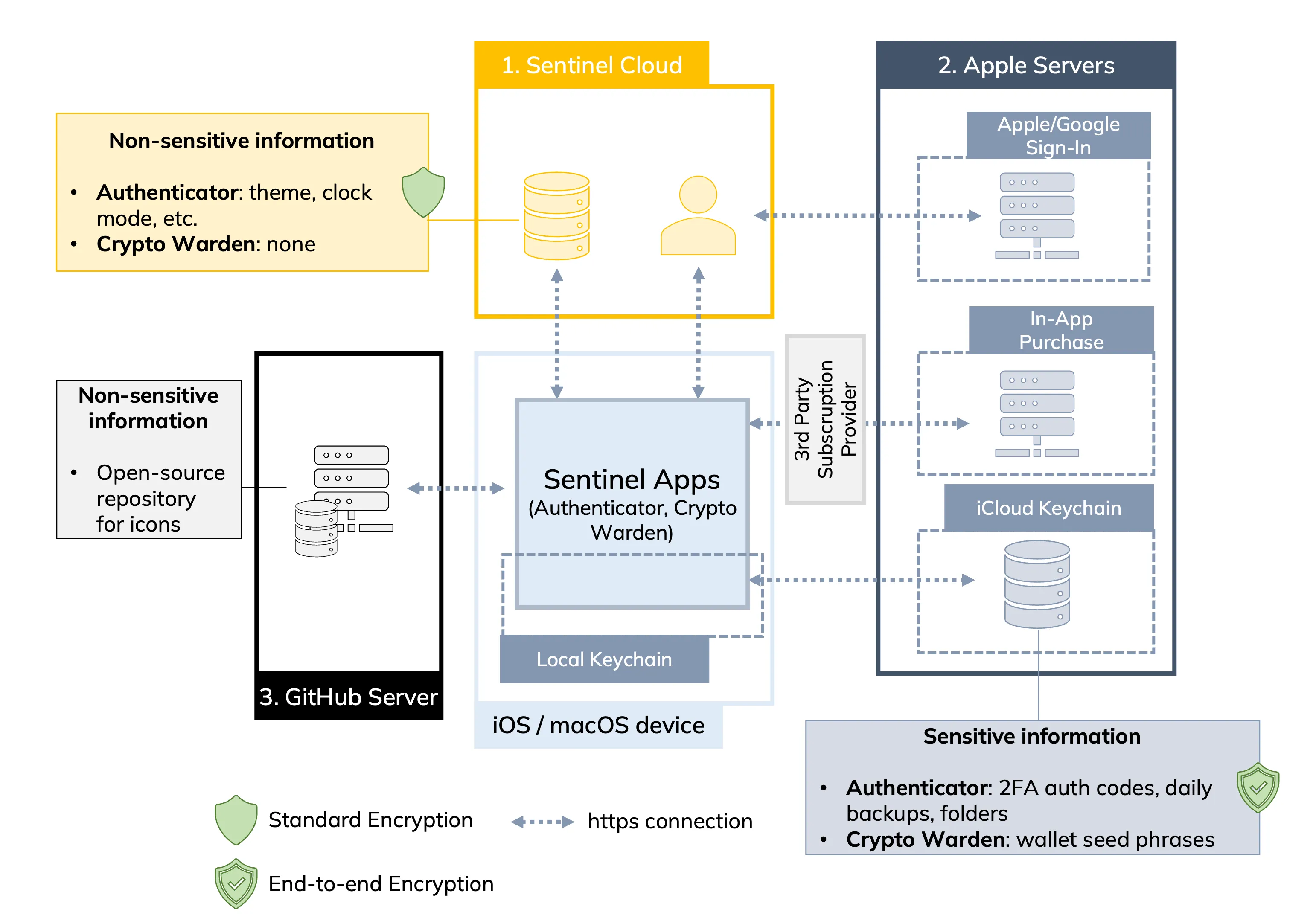
iCloud Keychain Architecture
Sentinel Cloud Architecture
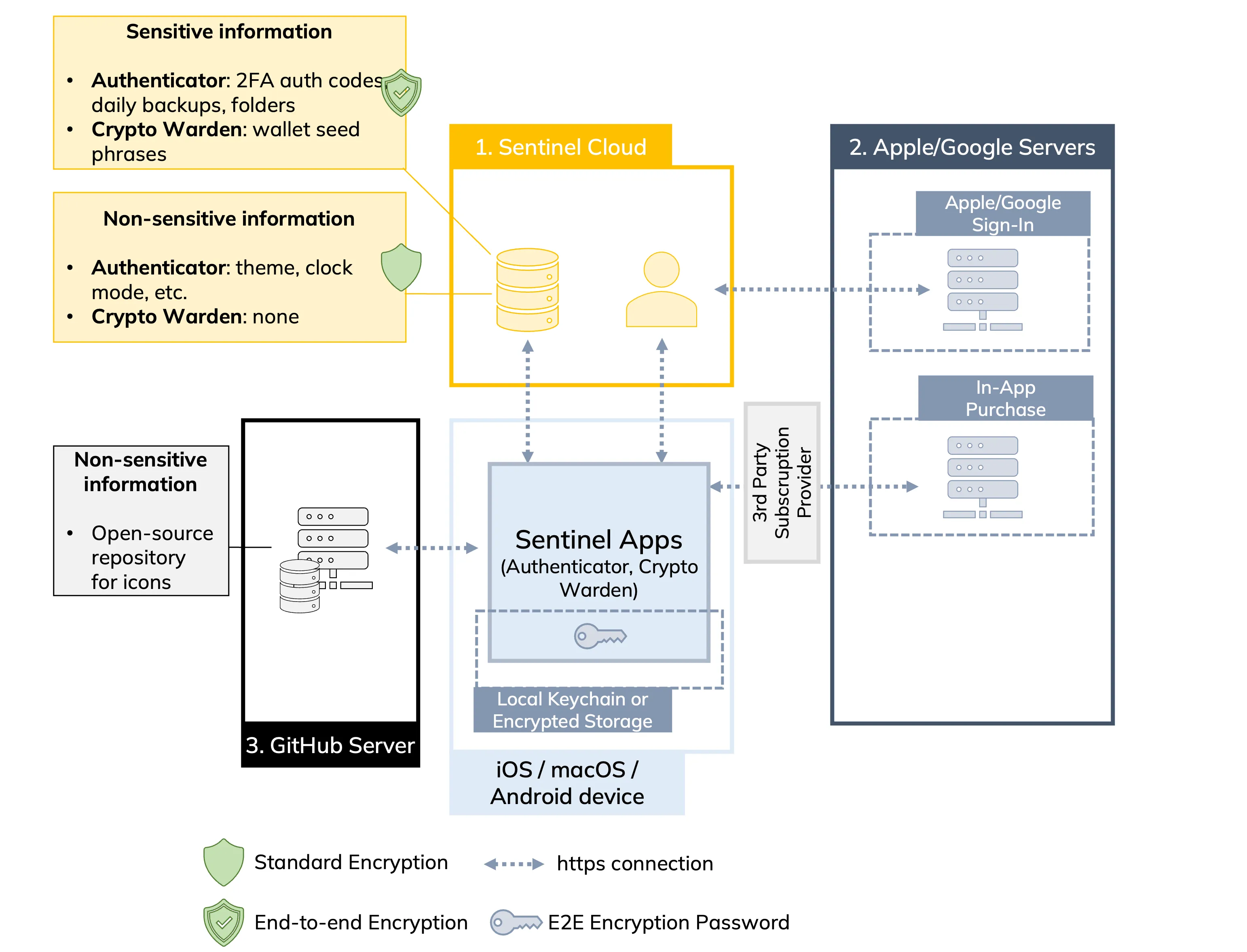
1. Sentinel Cloud
Our servers depend on Google Firebase services to provide authentication and storage.
1.1 Authentication
Authentication is managed through Apple Sign-In, which ensures security and privacy by using Apple's private email relay service, or Google Sign-in, required for Android or cross-platform syncing.
After sign-in, a randomly generated ID is created and assigned to the user's account. This ID is also available on the settings page within the app.
Users should sign-in to facilitate the transfer of their premium purchase across all devices via our subscription provider, receive important news related to Sentinel, and participate in shaping the roadmap of the products through polls and feedback.
1.2 Data Storage (non-sensitive)
Non-sensitive information is stored on Google Firestore, such as app configurations and metrics. Users must sign in to store data on Firestore, and the enforced security rules guarantee exclusive access only to the verified user. This means that each user can access only its own data.
1.3 Data Storage (sensitive)
Users can decide to save their data on Sentinel Cloud. If they do, the app will request to input a password to encrypt (via standard AES-256) all sensitive data before transmitting to the cloud. Passwords are only stored locally on the device, either in the Local Keychain (iOS, macOS) or Encrypted Storage (Android), and must be manually inserted in each device running Sentinel apps to properly decrypt the data. If you forget the password the data will be lost, since we have no knowledge nor access to the password.
This will guarantee a secure end-to-end encryption, meaning that in the unlikely event of a cyber attack against us, the data will be completely unreadable.
2. Apple Servers
Sentinel relies on Apple's servers for purchasing and restoring in-app purchases (IAP) and storing sensitive information.
2.1 Purchase and Store IAP
Although we rely on a third-party provider to manage and track IAP subscriptions and purchases (Revenue Cat), Apple manages the execution of the transaction through their IAP service.
2.2 Data Storage (sensitive)
All sensitive data, such as 2FA secrets or crypto seed phrases, is stored in the user's private iCloud Keychain.
We believe that Apple's security standard is a state-of-the-art solution to guarantee the protection possible for our users (see how iCloud Keychain works). We do not have any access to the users' data, and even in the unlikely event of a cyber attack against us, the data will be completely safe and inaccessible.
3. GitHub Pages
We have released an open-source repository on GitHub to manage Sentinel Authenticator's service icons. Users can directly open pull requests to submit missing icons or submit requests to the community to add them.
Sentinel apps may connect to the automatically generated GitHub Pages website to fetch the latest versions of the icons upon load.
As an open-source repository, all information is publicly available, and users can connect to the GitHub Pages website to fetch icons for other purposes without requiring a login.
Conclusions
If users decide to trust our apps, we will always be transparent in how we design them and guarantee the best for our users in terms of security and privacy.
We will constantly update this page to reflect how our apps work from a security and privacy perspective.
Feel free to get in touch if they need further information or just to chat.