
Stop getting hacked. Set up 2FA in seconds.
The most beautiful and secure authenticator app. Syncs across all your Apple & Android devices with military-grade encryption.
- 4.8/5 App Store
- 500,000+ users trust Sentinel
- No account needed
- Free to start
Trusted by teams at
Three steps to total security.
Setup takes under 60 seconds. No account creation. No email required. Just download and go.
Download the app
Free on iOS, macOS, and Android. Works on iPhone, iPad, Mac & Apple Watch.
Scan your QR codes
Add accounts by scanning QR codes. Import from Google Authenticator in one tap.
You're protected
Auto-syncs across all devices. Military-grade encryption keeps your codes safe.
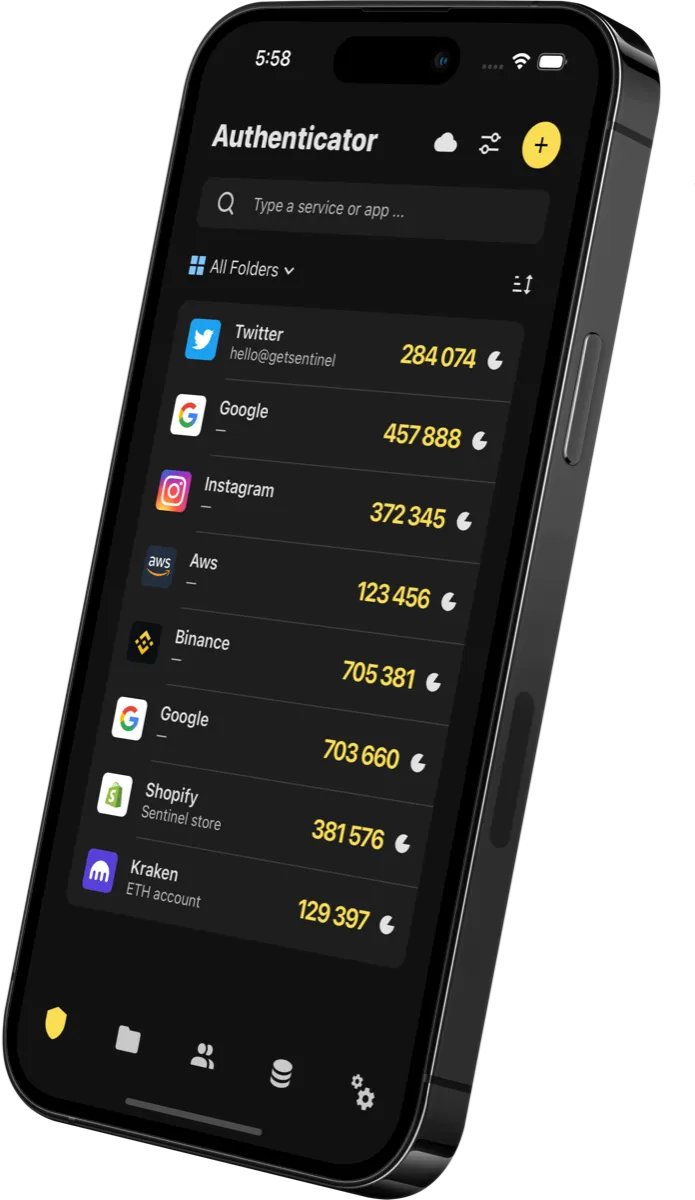
Everything a code deserves.
- E2E EncryptioniCloud Keychain or Sentinel Cloud
- Auto SyncAll devices, instantly
- Privacy FirstYour data stays yours, always
- Smart FoldersOrganize codes your way
- 15+ ThemesCustomize to match your style
- 1000+ IconsOpen-source icon library
Arrivals from the App Store.
“Went from Tofu to Sentinel! I was happy with Tofu but it had no syncing between devices. Sentinel does this securely with keychain! Interface is easy to use. Happy with my transition! Also icons are quickly added to its looks good too!”
SanderTrApp Store review
“This is the best authenticator app. Works on all my devices, is fast to use, automatic backups, and great support.”
/EquilibriumApp Store review
“This app "just works". Zero configuration and it already synchronizes through all of my devices. It makes 2FA so easy to use that I've been enabling this feature in much more services than I did before, resulting in more security for me for no added hassle.”
kiamlibrApp Store review
“Finally I can use MFA tokens in a whereever I am. Don't have my phone? Not a problem, it's on my Mac. How about if I just have my phone or iPad? Yes, it works there too. And yes, you can click(copy) / paste into your web applications. So smart. I use this all day long.”
Gump4487245App Store review
How Sentinel compares.
See how Sentinel stacks up against other authenticator apps, feature by feature.
| Feature |  Sentinel Sentinel |  Google Google |  Authy Authy |  Microsoft Microsoft |
|---|---|---|---|---|
| Sync | 1 | |||
| Travel back in time (Advanced Backups) | ||||
| Folders | ||||
| Privacy | 2 | |||
| Icons | ||||
| Themes & Personalizations | ||||
| Mac & Watch app | ||||
| Widget | ||||
| Responsive Customer Service | ||||
| Share Feature |
1 Not end-to-end encrypted, unsecured.
2 Only if not logged with a Google account.
Try Authenticator for free.
Start protecting your accounts today with military-grade security. No credit card required.
- 4.8/5 Stars · 100K+ Users
- Military-Grade Security
- Free to Start
Learn about two-factor authentication.
Discover how 2FA works and why it's essential for your online security.
What is Two-Factor Authentication (2FA) and How Does it Work?
Learn everything you need to know about 2FA - from the basics to advanced security practices. Discover why 99.9% of compromised accounts could have been prevented with two-factor authentication.
- Breach prevention
- 99.9%
- Stolen credentials
- 15B+
- Password breaches
- 81%
Best Authenticator Apps 2026: Complete Comparison Guide
Compare the top 2FA apps including Sentinel, Google Authenticator, Authy, and Microsoft Authenticator. See which one offers the best security, features, and value.
Compare apps now
Frequently asked questions.
Can't find the answer? Drop us an email
Which apps/services does it support?
Sentinel supports standard TOTP & HOTP. You can use it to protect your Instagram, Google, Facebook, Binance, Crypto.com, Shopify, & 10,000+ other services.
Can I migrate from Google Authenticator?
Yes! Export your data from Google Authenticator as a QR Code and simply scan it with Sentinel. It's that easy — takes less than 30 seconds.
How secure is Sentinel?
Sentinel uses the iCloud Keychain to store and transfer data — the same encrypted storage where Apple saves your Safari passwords. We use military-grade encryption.
Can you access our data?
No, we can't access your data even if we wanted to. They are stored in your private iCloud Keychain, accessible only by you. Zero-knowledge architecture.
What if the data is not syncing?
Make sure you have iCloud Keychain enabled on all your devices. You can find it under Settings > iCloud > Keychain and set it to "On".
How to add missing icons?
We have a GitHub open-source repository where you can add your icons or request us to add the one missing.
Is Premium shared with iCloud Family?
Yes, you can get Premium and have all your family use Sentinel to protect their accounts and data.
Do you provide support?
Sure! Drop us an email or a DM on Twitter and we'll get back ASAP.
